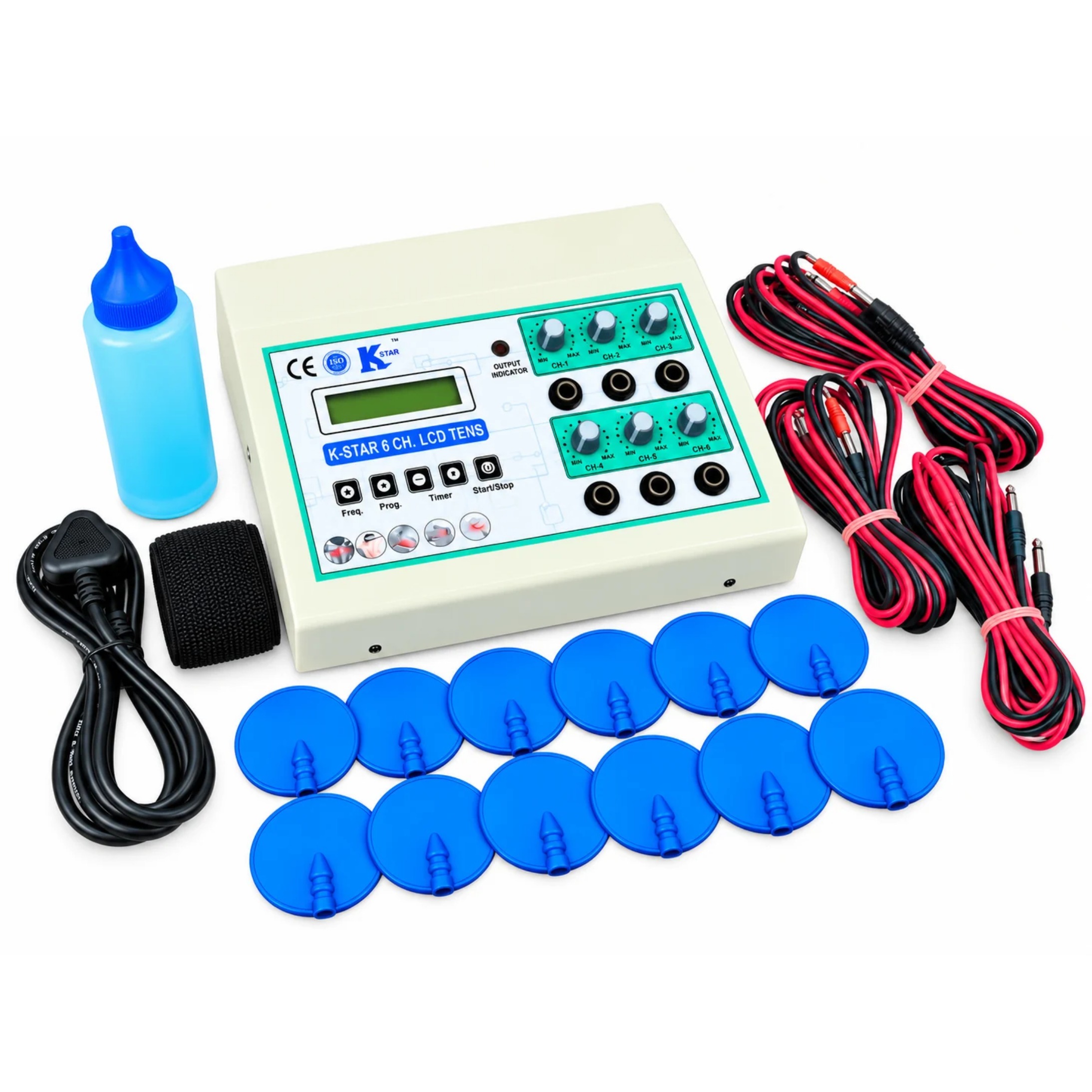
K-STAR 6 Channel TENS Machine with LCD Display | Digital Electrotherapy Unit for Physiotherapy & Muscle Stimulation | Multi-Channel Nerve Stimulator for Professional Use
The K-STAR 6 Channel TENS Machine with LCD Display by K-STAR INDIA – Khandoliya Industries, Karol Bagh, New Delhi is a digital electrotherapy device designed for physiotherapy, electrical nerve stimulation, muscle stimulation, and rehabilitation applications. Featuring a six-channel output system and an LCD display, this machine is intended to support controlled electrotherapy sessions in professional physiotherapy and rehabilitation settings. Transcutaneous Electrical Nerve Stimulation (TENS) uses electrical pulses delivered through electrodes placed on the skin. Depending on the device's capabilities and the selected treatment protocol, electrical stimulation may help provide temporary relief from certain types of pain. The K-STAR 6 Channel TENS Machine is designed for trained professionals who require a multi-channel electrotherapy unit for suitable treatment applications.
The six-channel configuration provides multiple output connections for electrotherapy applications. Depending on the specific machine's design, compatible leads, and channel controls, the practitioner can arrange electrode placement for suitable treatment areas. The number of channels alone does not establish how many areas can be treated simultaneously; users should confirm the output configuration and operating instructions for their exact model. Designed for professional therapy environments, the K-STAR 6 Channel TENS Machine can be considered for physiotherapy clinics, rehabilitation centres, hospitals, and other suitable healthcare facilities. It should be used as part of an appropriate care plan rather than as a substitute for medical assessment or prescribed treatment.
⭐ Key Features :
⭐ Six-Channel Output System: Designed for multi-channel electrotherapy applications.
⭐ LCD Digital Display: Provides a screen for viewing available operating information and settings.
⭐ TENS Electrotherapy Technology: Delivers electrical pulses through compatible electrodes according to the selected mode.
⭐ Physiotherapy Applications: Suitable for use in appropriate professional electrotherapy routines.
⭐ Muscle Stimulation Support: May be used for selected muscle stimulation applications when supported by the model.
⭐ Multiple Treatment Connections: Supports electrode-lead connections according to the machine's configuration.
⭐ Adjustable Treatment Settings: Use available controls to set parameters within the manufacturer's permitted ranges.
⭐ Professional Rehabilitation Equipment: Designed for use in suitable physiotherapy and rehabilitation settings.
⭐ Key Benefits :
⭐ Supports Temporary Pain Relief: TENS may help relieve certain types of pain for some users.
⭐ Provides Multi-Channel Flexibility: Offers multiple output connections for appropriately configured treatment setups.
⭐ Supports Selected Muscle Stimulation: Can be incorporated into professional muscle stimulation routines when indicated.
⭐ Helps Organize Therapy Sessions: A digital display can make available settings easier to monitor.
⭐ Complements Rehabilitation Programs: May be used alongside other treatments and exercises recommended by a healthcare professional.
⭐ Suitable for Professional Practice: Designed for use in clinics and rehabilitation environments.
⭐ Offers Treatment Customization: Available parameters can be selected according to the machine's capabilities and professional guidance.
⭐How to Use K-STAR 6 Channel TENS Machine with LCD Display :
Step-by-Step Usage Instructions-
Step 1: Inspect the Machine
#Check the machine, electrode leads, connectors, and electrode pads for damage.
#Confirm that the accessories are compatible with your model.
#Ensure all intensity controls are set to zero and the machine is switched off.
Step 2: Prepare the Skin
#Clean and dry the skin where the electrodes will be placed.
#Check that the skin is intact and has normal sensation.
#Ask a qualified physiotherapist to identify the correct electrode positions for the intended treatment.
Step 3: Connect the Electrodes
#Connect the compatible electrode leads to the designated output channels.
#Attach the electrode pads to the lead connectors.
#Keep the machine switched off while connecting or repositioning the electrodes.
Step 4: Position the Electrode Pads
#Place the pads on or around the selected treatment area as directed by the physiotherapist.
#Keep the pads separated according to the manufacturer's instructions.
#Ensure the pads adhere evenly to clean, dry skin.
#Do not guess electrode placement or assume all six channels should be used at once.
Step 5: Switch On the Machine
#Turn on the unit using the designated power control.
#Check the LCD display for the available modes and settings.
#Select only the mode prescribed by the physiotherapist and supported by your model.
Step 6: Begin at a Low Intensity
#Start with the lowest intensity setting.
#Increase it gradually until you feel a comfortable tingling sensation.
#The stimulation should not be painful, burning, or excessively strong.
#Do not increase intensity simply to make the muscles contract more strongly.
Step 7: Monitor the Treatment
#Remain in a comfortable position and monitor how the stimulation feels.
#Follow the treatment duration prescribed by the physiotherapist and the machine's manual.
#Check the skin if discomfort or irritation develops.
#Stop the machine if you experience pain, burning, dizziness, or unusual symptoms.
Step 8: Finish the Session
#Reduce all active channel intensities to zero.
#Switch off the machine before removing the electrode pads.
#Disconnect the leads carefully without pulling on the wires.
#Inspect the skin for irritation and clean and store the accessories according to the manufacturer's instructions.
⭐Important Safety Precautions :
1. Do not use TENS if you have a pacemaker or another implanted electronic device unless your treating clinician and the device manufacturer specifically confirm it is safe.
2. People with epilepsy, pregnancy, heart rhythm disorders, reduced sensation, or other relevant medical conditions should seek professional advice before use.
3. Never place electrodes on the front or sides of the neck, across the chest, over the eyes or mouth, or on broken, infected, or numb skin.
4. Do not use the machine while bathing, showering, sleeping, driving, or operating machinery.
5. Do not attach or remove electrodes while the output is active.
6. Use only compatible electrode pads and leads.
7. Do not use the device as a substitute for medical diagnosis or treatment.
Available At :
K-STAR INDIA (Khandoliya Industries)
➡️Acupressure & Acupuncture | Physiotherapy | Panchakarma & Magnet | Cupping & Hijama | Product & Equipment
📍Address: Shop No. 3, Near Gurudwara Road, Opposite Union Bank, Block 6, WEA, Karol Bagh, New Delhi – 110005.
📞Contact: 9560379805, 9413023521
9625359462, 08048033068
🌐 Website: www.kstarindia.com
🌐 www.acupressuredelhi.com
📍 Google Map: https://share.google/RxxycSz348HpcxxVm
**Choose Khandoliya Industries — A Name You Can Trust in Natural Wellness.**
The K-STAR 6 Channel TENS Machine with LCD Display by K-STAR INDIA – Khandoliya Industries, Karol Bagh, New Delhi is a digital electrotherapy device designed for physiotherapy, electrical nerve stimulation, muscle stimulation, and rehabilitation applications. Featuring a six-channel output system and an LCD display, this machine is intended to support controlled electrotherapy sessions in professional physiotherapy and rehabilitation settings. Transcutaneous Electrical Nerve Stimulation (TENS) uses electrical pulses delivered through electrodes placed on the skin. Depending on the device's capabilities and the selected treatment protocol, electrical stimulation may help provide temporary relief from certain types of pain. The K-STAR 6 Channel TENS Machine is designed for trained professionals who require a multi-channel electrotherapy unit for suitable treatment applications.
The six-channel configuration provides multiple output connections for electrotherapy applications. Depending on the specific machine's design, compatible leads, and channel controls, the practitioner can arrange electrode placement for suitable treatment areas. The number of channels alone does not establish how many areas can be treated simultaneously; users should confirm the output configuration and operating instructions for their exact model. Designed for professional therapy environments, the K-STAR 6 Channel TENS Machine can be considered for physiotherapy clinics, rehabilitation centres, hospitals, and other suitable healthcare facilities. It should be used as part of an appropriate care plan rather than as a substitute for medical assessment or prescribed treatment.
⭐ Key Features :
⭐ Six-Channel Output System: Designed for multi-channel electrotherapy applications.
⭐ LCD Digital Display: Provides a screen for viewing available operating information and settings.
⭐ TENS Electrotherapy Technology: Delivers electrical pulses through compatible electrodes according to the selected mode.
⭐ Physiotherapy Applications: Suitable for use in appropriate professional electrotherapy routines.
⭐ Muscle Stimulation Support: May be used for selected muscle stimulation applications when supported by the model.
⭐ Multiple Treatment Connections: Supports electrode-lead connections according to the machine's configuration.
⭐ Adjustable Treatment Settings: Use available controls to set parameters within the manufacturer's permitted ranges.
⭐ Professional Rehabilitation Equipment: Designed for use in suitable physiotherapy and rehabilitation settings.
⭐ Key Benefits :
⭐ Supports Temporary Pain Relief: TENS may help relieve certain types of pain for some users.
⭐ Provides Multi-Channel Flexibility: Offers multiple output connections for appropriately configured treatment setups.
⭐ Supports Selected Muscle Stimulation: Can be incorporated into professional muscle stimulation routines when indicated.
⭐ Helps Organize Therapy Sessions: A digital display can make available settings easier to monitor.
⭐ Complements Rehabilitation Programs: May be used alongside other treatments and exercises recommended by a healthcare professional.
⭐ Suitable for Professional Practice: Designed for use in clinics and rehabilitation environments.
⭐ Offers Treatment Customization: Available parameters can be selected according to the machine's capabilities and professional guidance.
⭐How to Use K-STAR 6 Channel TENS Machine with LCD Display :
Step-by-Step Usage Instructions-
Step 1: Inspect the Machine
#Check the machine, electrode leads, connectors, and electrode pads for damage.
#Confirm that the accessories are compatible with your model.
#Ensure all intensity controls are set to zero and the machine is switched off.
Step 2: Prepare the Skin
#Clean and dry the skin where the electrodes will be placed.
#Check that the skin is intact and has normal sensation.
#Ask a qualified physiotherapist to identify the correct electrode positions for the intended treatment.
Step 3: Connect the Electrodes
#Connect the compatible electrode leads to the designated output channels.
#Attach the electrode pads to the lead connectors.
#Keep the machine switched off while connecting or repositioning the electrodes.
Step 4: Position the Electrode Pads
#Place the pads on or around the selected treatment area as directed by the physiotherapist.
#Keep the pads separated according to the manufacturer's instructions.
#Ensure the pads adhere evenly to clean, dry skin.
#Do not guess electrode placement or assume all six channels should be used at once.
Step 5: Switch On the Machine
#Turn on the unit using the designated power control.
#Check the LCD display for the available modes and settings.
#Select only the mode prescribed by the physiotherapist and supported by your model.
Step 6: Begin at a Low Intensity
#Start with the lowest intensity setting.
#Increase it gradually until you feel a comfortable tingling sensation.
#The stimulation should not be painful, burning, or excessively strong.
#Do not increase intensity simply to make the muscles contract more strongly.
Step 7: Monitor the Treatment
#Remain in a comfortable position and monitor how the stimulation feels.
#Follow the treatment duration prescribed by the physiotherapist and the machine's manual.
#Check the skin if discomfort or irritation develops.
#Stop the machine if you experience pain, burning, dizziness, or unusual symptoms.
Step 8: Finish the Session
#Reduce all active channel intensities to zero.
#Switch off the machine before removing the electrode pads.
#Disconnect the leads carefully without pulling on the wires.
#Inspect the skin for irritation and clean and store the accessories according to the manufacturer's instructions.
⭐Important Safety Precautions :
1. Do not use TENS if you have a pacemaker or another implanted electronic device unless your treating clinician and the device manufacturer specifically confirm it is safe.
2. People with epilepsy, pregnancy, heart rhythm disorders, reduced sensation, or other relevant medical conditions should seek professional advice before use.
3. Never place electrodes on the front or sides of the neck, across the chest, over the eyes or mouth, or on broken, infected, or numb skin.
4. Do not use the machine while bathing, showering, sleeping, driving, or operating machinery.
5. Do not attach or remove electrodes while the output is active.
6. Use only compatible electrode pads and leads.
7. Do not use the device as a substitute for medical diagnosis or treatment.
Available At :
K-STAR INDIA (Khandoliya Industries)
➡️Acupressure & Acupuncture | Physiotherapy | Panchakarma & Magnet | Cupping & Hijama | Product & Equipment
📍Address: Shop No. 3, Near Gurudwara Road, Opposite Union Bank, Block 6, WEA, Karol Bagh, New Delhi – 110005.
📞Contact: 9560379805, 9413023521
9625359462, 08048033068
🌐 Website: www.kstarindia.com
🌐 www.acupressuredelhi.com
📍 Google Map: https://share.google/RxxycSz348HpcxxVm
**Choose Khandoliya Industries — A Name You Can Trust in Natural Wellness.**
Keywords